
Slope Calculator: Free Step-by-Step Solution and Graph
This free slope calculator works with whatever you have: an equation, two points, or a point and a slope. Pick the matching tab, type your numbers and press Calculate.
You get the slope, a graph of your line and a step-by-step solution. Copy it, download it as a PDF, or follow the steps to learn how the slope was found.
Five ways to enter your problem:
What Is a Slope Calculator?
A slope calculator finds how steep a straight line is: how far it rises or falls for every step it moves to the right. You give it what you know about the line, and it returns the slope plus related line measurements.
Depending on your inputs, one calculation gives you:
- The slope, as a fraction and a decimal
- The equation of the line in slope intercept, point slope and standard form, where they apply. A vertical line is written as x = a, because it has no y = mx + b form.
- Both intercepts, where the line crosses each axis
- The angle, in degrees and radians
- The percent grade
- The rise : run ratio
- The distance between your points, when you enter two points
Who uses it: students checking homework, teachers building answer keys, and builders working out ramps, roofs and drainage.
Five Ways to Enter Your Line
Choose the format you already have. The calculator takes five.
| Tab | What you enter | Example |
|---|---|---|
| Two Points | x₁, y₁, x₂, y₂ | (1, 2) and (4, 6) |
| Point & Slope | one point and the slope | (−2, 3) and m = 2/5 |
| Slope Intercept | m and b | m = 1/3, b = −2 |
| Rise Over Run | the rise and the run | rise 6, run 12 |
| From Equation | the whole equation | 3x + 4y = 12 or y − 2 = 3(x − 1) |
What you can type:
- Number boxes (first four tabs): whole numbers, decimals, fractions and mixed numbers, such as 3, −1.5, 3/4 or 2 1/2.
- From Equation tab: supported linear equations in x and y, such as y = 2x + 3, 3x + 4y = 12 or y − 2 = 3(x − 1). The calculator rearranges them, so you never pull out the values by hand.
- Mixed numbers in an equation: write them as a fraction or decimal, such as (5/2)x or 2.5x, not 2 1/2x.
- Input limits: absolute values up to 1015, with at most 15 significant digits. This limits what you type; it does not promise every result is an exact fraction. Rounded results are marked with ≈.
How to Use This Slope Calculator
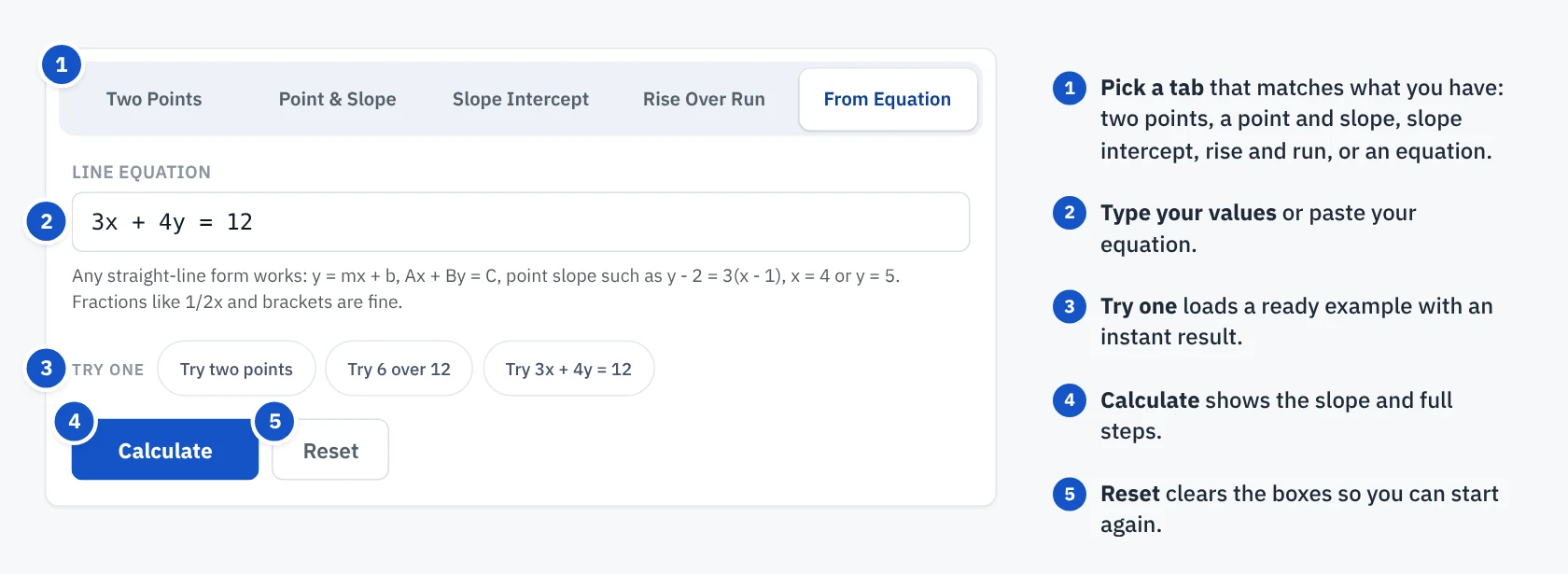
- Pick a tab that matches what you know: two points, a point and slope, slope and intercept, rise and run, or an equation.
- Enter your values. Use fractions for repeating values such as 1/3; terminating decimals such as 0.25 are exact too. On the From Equation tab, type the line much as it appears in your book, such as y − 2 = 3(x − 1).
- Press Calculate. The slope appears in the result panel, with the equation forms and the graph below it.
- Download, copy or print the result. The PDF holds your inputs, the results and the working, step by step.
Not sure where to start? Tap one of the Try one buttons to load a worked example.
How to Read Your Results
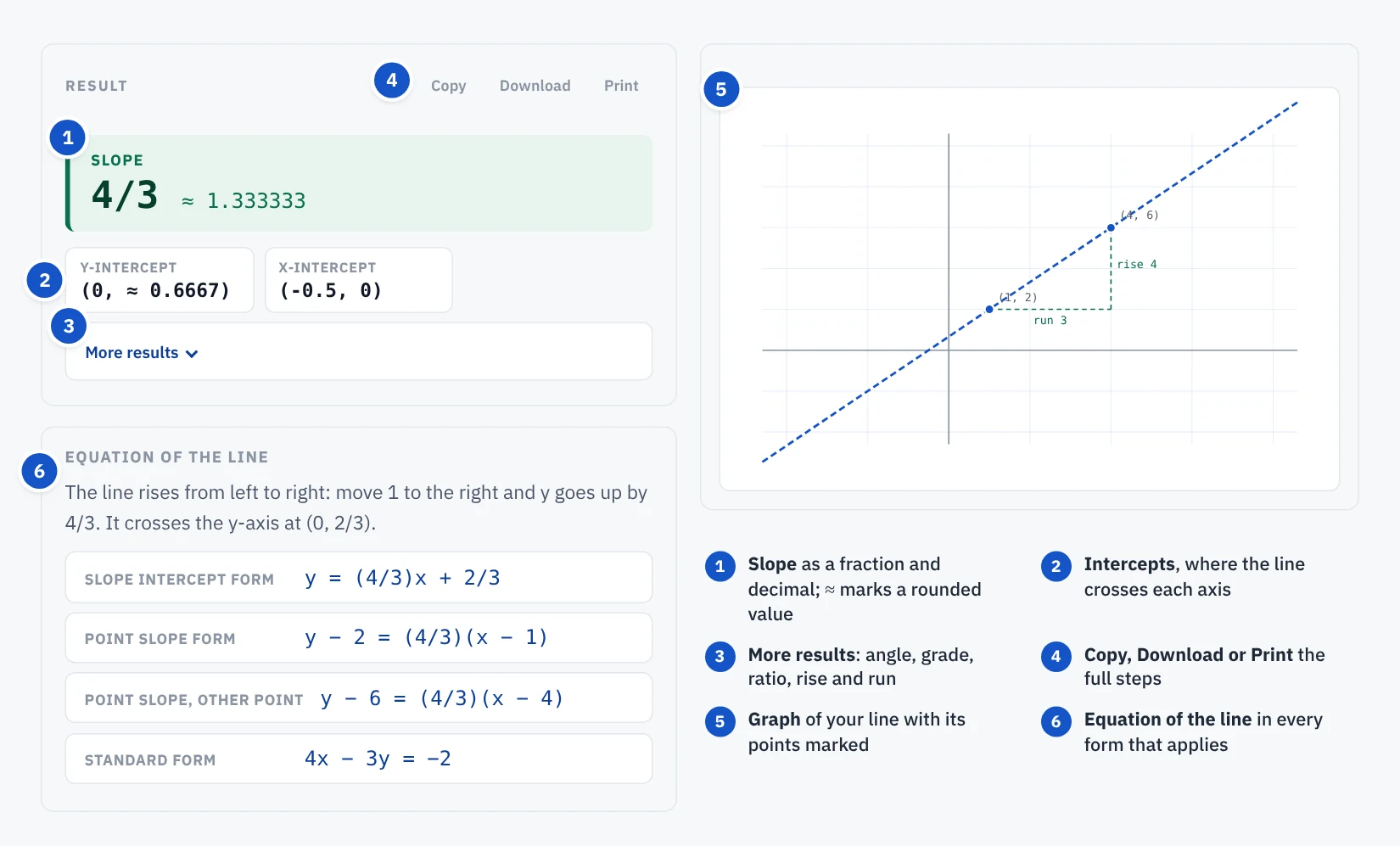
Each part of the result answers one question about your line.
- Slope: the headline number. It may show a whole number, a decimal, a fraction or both forms. When a decimal is rounded, it is marked with ≈, as in 4/3 ≈ 1.333333, where the fraction is exact.
- Y-intercept: where the line crosses the y-axis, shown as a point, like (0, 2/3).
- X-intercept: where the line crosses the x-axis, like (−0.5, 0). A flat line such as y = 3 has none, and y = 0 lies along the x-axis, so it has no single x-intercept.
- Slope intercept form: the line as y = mx + b.
- Point slope form: the line as y − y₁ = m(x − x₁), built from a point you entered or one the calculator found on the line.
- Standard form: the line as Ax + By = C, with whole-number coefficients wherever possible.
- Angle: the signed angle from the positive x-axis, negative for a falling line. For a falling line the calculator also gives the angle of inclination, measured from 0° to 180°, so −36.87° and 143.13° describe the same line.
- Percent grade: the slope × 100, the way roads and ramps are measured.
- Ratio: rise : run in lowest terms, like 4 : 3.
- Radians: the same angle in radians.
- Rise and run: the change in y and the change in x.
- Distance: the straight-line length between your two points, shown on the Two Points tab.
- Graph: your line drawn on a grid, with your points marked.
If you change an input after calculating, the result fades and asks you to recalculate. Copy, Download and Print stay off until you do, so you never save an answer that no longer matches your numbers.
Slope Formula: How to Calculate the Slope of the Line Manually
The slope formula divides the change in y by the change in x between two points on the line.
The top of the fraction is the rise and the bottom is the run. Take the points (1, 2) and (4, 6): the rise is 6 − 2 = 4 and the run is 4 − 1 = 3, so the slope is 4/3, about 1.333.
The sign and size of m tell you the line’s shape.
- Positive slope: the line climbs from left to right.
- Negative slope: the line falls from left to right.
- Zero slope: the line is flat, like y = 3.
- Undefined slope: the line is vertical, like x = 2. The run is 0, and you cannot divide by 0.
Why Slope Calculators Give Different Answers
Two slope calculators can show different answers for the same points. Sometimes both are right and only the format differs, such as a signed angle of −36.87° against an inclination of 143.13°. Other times the cause is how a tool reads or handles numbers. These are the issues that can change a result.
- Fractions turned into decimals. A tool may convert 1/3 to 0.333 before it calculates. That small cut changes the slope and can carry into every later result.
- Hidden rounding. A slope of 4/3 may be shown as 1.33333 with no sign that it was rounded. Copy it into the next step of a problem, and later answers can drift.
- Computer noise. Computers store decimals like 0.1 in binary, which cannot hold them exactly. If a tool does not clean this up, a step can show 0.39999999999999997 instead of 0.4.
- Very small slopes rounded to zero. A line that rises gently, such as 1 unit over a trillion, can be reported as slope 0, angle 0° and grade 0%. That turns a sloped line into a flat one.
- Special lines handled wrongly. A flat line like y = 3 never crosses the x-axis, yet a tool may still print an x-intercept. A vertical line’s slope may be called “infinity” when it is undefined.
- Old answers left on screen. If a tool cannot read an input and shows no error, the previous result can stay in place. It looks like an answer, but it belongs to different numbers.
- Misread input. A tool may join numbers that were separated by a space, so 2 1/2x is read as 21/2x, or quietly ignore part of an entry. The answer looks normal but belongs to a different line.
- Degrees and radians. A slope of 1 corresponds to 45°, or approximately 0.7854 radians. These describe the same angle. Check the unit label before comparing results from different tools.
- Answer format requirements. A homework system may require an exact fraction or a specific number of decimal places. For example, 2/3 is exact, while 0.6667 is rounded. Follow the question’s requested format.
How Our Slope Calculator Avoids These Errors
The calculator makes input errors, rounding and special cases easier to identify through the following features.
- Fractions first. Slopes are kept as reduced fractions where the inputs allow, and a decimal is shown beside them, marked with ≈ if rounded.
- Clean numbers. Results are tidied before display, so 0.1 + 0.2 style noise is cleaned out of the screen and the PDF.
- Tiny values kept. A slope of 0.000000000001 is shown as it is, never rounded down to 0.
- Special lines explained. Vertical lines are called undefined with the equation x = a. A horizontal line y = b shows no x-intercept when b ≠ 0, and y = 0 is flagged as lying along the axis. Identical points get a clear message.
- No stale results. Edit any input and the old answer is flagged, and exports lock until you recalculate.
- Clear refusals. If an entry cannot be read, such as y = x², a stray letter, or 2 1/2x typed on the From Equation tab, the calculator says why instead of guessing.
- Angles worked out properly. For nonvertical lines, the signed angle is calculated using arctan(m), with clearly labelled degree and radian results. Vertical lines are handled separately.
Tips to Calculate Slope Accurately
- Use fractions, not rounded decimals. If a value is one third, type 1/3, not 0.3334. A rounded input gives a slightly wrong slope, and the error can carry into later results.
- Keep the order the same. Subtract in the same order on the top and bottom: y₂ − y₁ over x₂ − x₁. Mixing the order flips the sign of the slope.
- Watch negative signs. Subtracting a negative adds, so 5 − (−3) = 8. Use brackets when you work by hand.
- Check the x-values first. If two different points share the same x-value, the line is vertical and the slope is undefined. If both points are identical, they do not determine a unique line.
- Reduce your fraction. 8/6 and 4/3 are the same slope, but most teachers expect the reduced form.
- Read equations carefully. In y = (1/2)x + 3 the slope is 1/2. In 3x + 4y = 12 it is −3/4, not 3, because you must solve for y first.
How to Check If Your Slope Is Right
Use these checks to spot common mistakes. For two distinct points, substituting both into the calculated line equation verifies that the line passes through them; the other checks are quick sanity tests.
- Check both points. Put each of your two points into the equation. If both make it true, the line is right. For a vertical line, check that both points have x = a.
- Swap the points. Calculate again with the points reversed. The slope must come out exactly the same.
- Look at the direction. If the line climbs from left to right, the slope must be positive. If it falls, negative.
- Count on the graph. From the leftmost point, move right by the horizontal distance, then up or down by the vertical change. If you follow the calculator’s signed rise and run instead, start from Point 1 and move left when the run is negative. Either way you should land on the other point.
Frequently Asked Questions
Why does my answer differ from another slope calculator?
Often the format differs, such as a rounded decimal against a fraction, or a signed angle against an angle of inclination. Other causes are hidden rounding, misread input or a special line handled wrongly. This calculator shows fractions where it can and marks rounded values with ≈.
What is the difference between a zero slope and an undefined slope?
A zero slope is a flat line, like y = 3. An undefined slope is a vertical line, like x = 2, where the run is 0.
Does it matter which point I enter first?
No. Swapping the points changes the sign of both the rise and the run, so the slope stays the same.
Can I find the slope from an equation?
Yes. Open the From Equation tab and type a supported linear equation, such as 3x + 4y = 12. The calculator rearranges it and shows the steps.
How do I turn a slope into degrees or a percent grade?
For a nonvertical line, the angle is arctan(m) and the percent grade is m × 100. A vertical line stands at 90° and has no percent grade. A slope of 1 is 45° and a 100% grade. Both appear in the results.
Should I enter fractions or decimals?
Fractions whenever the number repeats, such as 1/3 or 2/7. Decimals that end, such as 0.25, are already exact.
Can I use this for roofs, ramps or driveways?
This page is built for line slope in math. For building work, our dedicated roof pitch, ramp and grade calculators give results in the units those trades use.